
One site, every language, one panel.
Add languages, enter translations side by side and send each visitor to the right one. No second copy of your site to maintain.
When every language is its own site
Adding a second language usually means copying pages. When the design changes you update every copy by hand, a page added in one language goes missing in the other, and menu links drop visitors into the wrong language.
Language is a layer, not a copy
In Kullya you build pages, layouts and views once. Only the text changes: labels and content fields hold a value per language, and the site renders whichever language it was opened in.
- One design, separate text per language
- Menus and internal links keep the visitor's language
- Language comes from the URL path, a query parameter or the domain
- Language settings travel with sync and site packages
Opening your site to a second language
Add languages
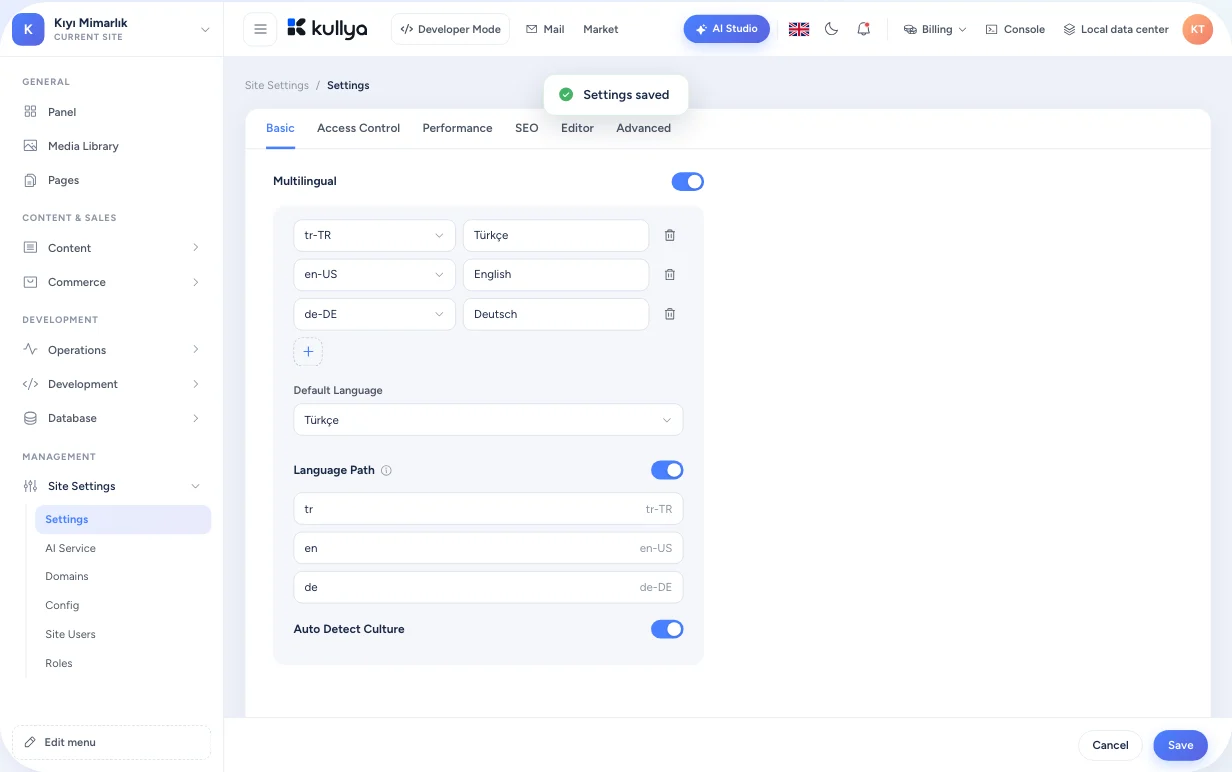
Turn on multilingual publishing in site settings, add the languages you need and give each a display name.
Pick a default
Decide which language the site opens in when the visitor's language is unknown.
Choose the URL structure
With the language path on, URLs start with a prefix such as /en/. With it off, the language travels in a lang parameter.
Scan for text
From the Labels screen, scan your pages for translatable text. Confirm what was found and it joins the label list.
Enter translations
Write each label and content field per language. For bulk work, export the labels and import them back.
Add a language switcher
In your template, use the helper that returns the site's languages and the current page's URL in each one to build the menu.
What you can do
Labels and structured content
Recurring interface text such as buttons and headings is kept as labels. In content like news, products or team members, you mark each field as multilingual or shared.
Three URL strategies
The language is picked by a path prefix, a lang query parameter or a bound domain. Bind a domain to a language and visitors arriving there see that language straight away.
Language detection
Optionally let the first visit pick a language from the browser's preference. The visitor's choice is remembered on the pages that follow.
Links that keep the language
Menus and in-page links carry the current language's prefix or parameter on their own, so changing pages never switches the language.
Translation for single-page apps
Developers manage and export the text of single-page apps running inside the site in a separate translation list.
Labels with Kullya AI
Kullya AI can read and write your site's labels with a value for each language. The result sits in the same list as labels you enter by hand, and you edit it there.
You stay in control
- Translations are never published on their own; you write or approve the text for each language.
- You choose the language code and display name; removing a language also removes its URL path.
- Turn multilingual publishing off and the site goes back to its default language.
- How search engine tags and sitemaps are produced per language depends on your template; check this on your own site.
Who it's for
- Businesses
- Enter a new market by adding a language to the site you already have, not by building a second one.
- Agencies
- The design you built for a client stays the same in every language, so upkeep happens in one template.
- Content teams
- See labels and content fields side by side and spot missing translations in each language's column.
- Developers
- Read the active language and language URLs from templates and KScript, and build the switcher your way.
- Operations teams
- Operations teams manage languages and multilingual publishing from site settings, instead of hosting and maintaining a separate site copy per language.
Add a second language to your site
Turn on languages, scan for text and enter your first translation. Your design stays untouched.