
Three levels, one site: AI, templates and KScript.
Start in plain language, shape it with HTML templates, extend it with KScript. Everything you write lives as an object of the same site and ships from the same place.
A closed site builder, or everything from scratch
Off-the-shelf tools hit a wall: when you need a custom API, a business rule or an integration, there's no way out. Building from scratch means setting up the server, database, deployment and content management one by one.
The extension point is inside the product
In Kullya, templates, scripts and data are all objects of the same site. Attributes you add to HTML are merged with data on the server, and KScript reaches the same content, database and user objects. No separate server to run, no build step to add.
- Template Engine: server-side rendering with attributes like k-for, k-if and k-label.
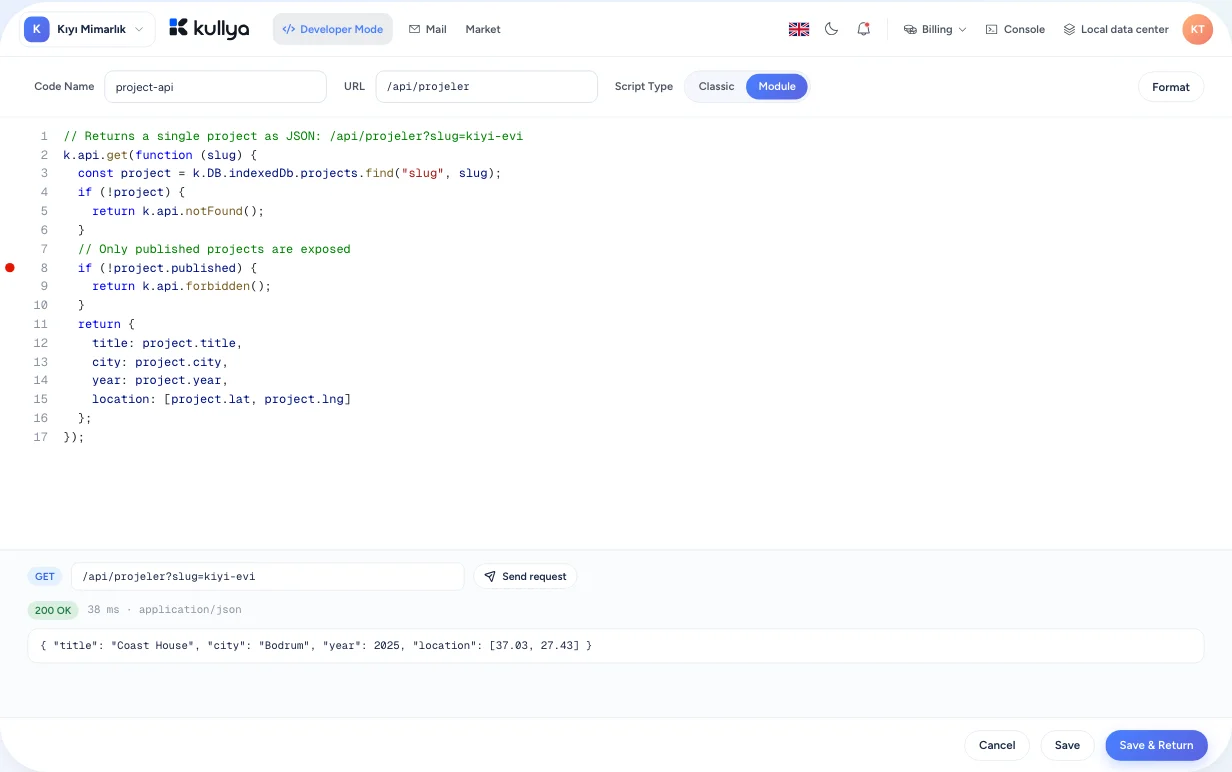
- KScript: APIs, page scripts and event code in JavaScript syntax.
- In-browser code editing, breakpoint debugging and script logs.
From skeleton to API
Sketch it with AI
Create the first version of the site in plain language. Pages, views and styles arrive as objects you can edit.
Bind a view to data
Loop over a content list with k-for and add conditions with k-if. The page is rendered on the server with its data.
Write an API in KScript
Create an API in the development section: validate request parameters, write to the database, return a response.
Debug it
Run the code in the browser with breakpoints, watch variables and read the script logs.
Package and move it
Export selected objects or the whole site as a package and install it on another site.
The developer side of the platform
Template Engine
Loops, conditions, content binding, labels and placeholders through k- attributes on standard HTML. Your designer's markup stays intact and still works with data.
KScript
One scripting language for page scripts, API endpoints, payment callbacks and events. Request and response, content, database, site users, sessions, email and files are ready to use.
Database and relations
Define tables for your site and relate them to each other; reach the same data from KScript and from templates.
Authentication and OpenAPI
Write authentication rules for site members and connect external services through their OpenAPI definitions.
Events and scheduled jobs
Attach code to front-end and server events, and define jobs that run on a schedule.
An in-browser dev environment
Developer mode opens pages, views, scripts and styles side by side in tabs, with code search and the code log in the same place.
Flexible, within limits
- The objects KScript can reach and how long it can run are limited on the server.
- Code changes go into the site log, where you can compare them with earlier versions and roll back.
- Access to the development section is managed with roles and permissions.
- Exported packages don't carry the credentials of your publishing targets.
Who it's for
- Businesses
- When built-in features aren't enough, extend your site with a developer without moving to another platform.
- Agencies
- Package the views, scripts and modules you reuse, and install them on new client sites.
- Content teams
- Templates your developer binds are fed by content records, so you only manage the content.
- Developers
- Server, database and deployment are already there; focus on business logic and UI. Start with the HTML and JavaScript you know.
- Operations teams
- Operations teams see successful and failed scheduled job runs with their messages, while step and recursion limits for scripts are enforced on the server.
Write your first API
Keep going in KullyaLib with the Template Engine and KScript getting-started guides.