
See your traffic the way your server sees it.
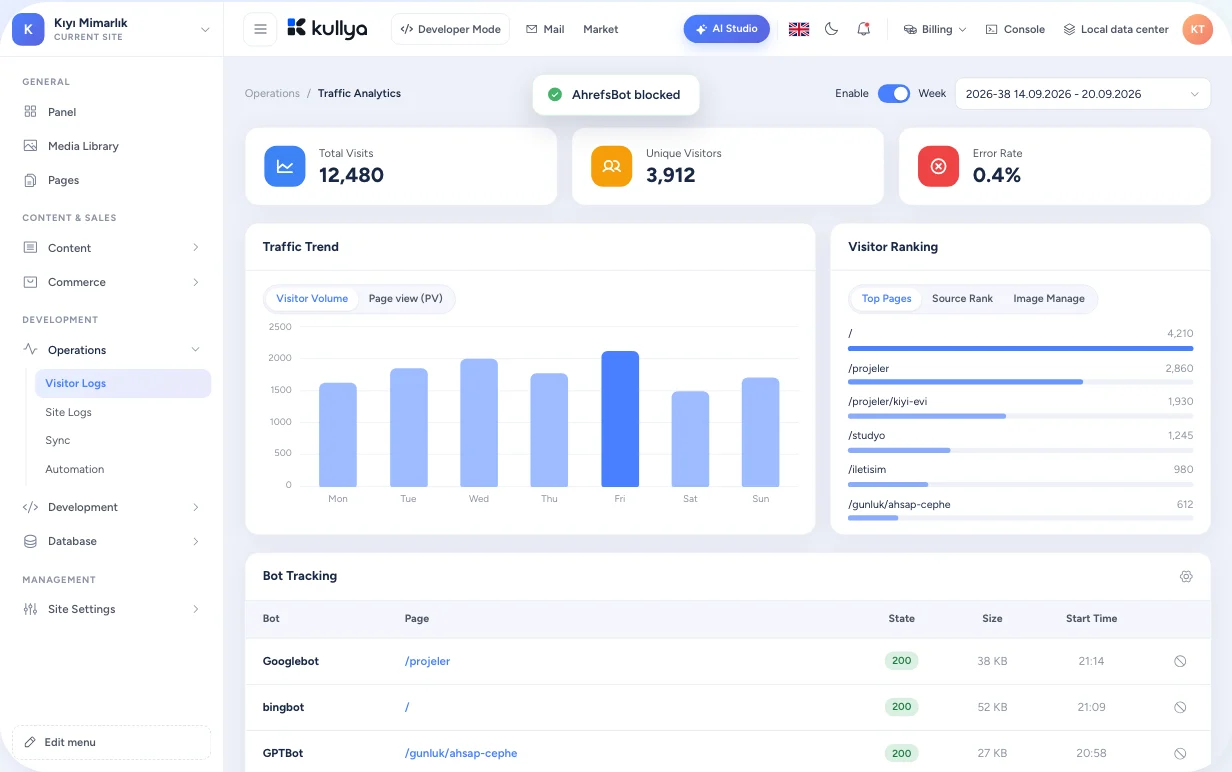
Visitor logs are written on the server, at the moment a request is answered. You see which pages open, what fails and which bots arrive, and you can set limits from the same screen.
Browser tracking misses a lot
Tracking scripts in the browser only count visitors who load the page and run JavaScript. Image and file requests, bots, broken URLs and traffic that strains the site never show up. And once you spot a problem, blocking it means switching to yet another tool.
Measured where the request is served
Kullya is the platform that serves your site, so it can record incoming requests directly. No extra script goes on your pages, and protection rules sit right next to the logs you are reading.
- Page, image and file requests in the same log
- Status code, response size and response time for every request
- Known bots listed separately from human traffic
- Block or rate limit straight from a log entry
A review in the panel
Turn on visitor logs
Enable visitor logging in the site settings. Logs are kept week by week.
Get the weekly picture
Follow the traffic chart and see the top pages, images and referring sites.
Find the errors
Check the error list for missing or failing URLs and their status codes.
Separate the bots
See which crawlers visit and how many requests they make in the bot panel.
Set a rule
Pick a suspicious entry, then block its IP address or set a request limit per time window for that IP or user agent.
What you can see and do
Every request, one record
URL, status code, response size, response time, referrer, browser and country. Image and file requests are visible alongside pages.
Ready-made summaries
Top pages, most requested images, referring sites, browsers and countries in a weekly view.
Error tracking
Failing and missing URLs get their own list, so you find a broken link or a missing file before a visitor reports it.
Bot detection
Known search engine and crawler bots are recognised from their user agent and shown apart from human visitors.
Access and rate limits
An IP blocklist, blocking by user agent keyword, request limits per IP or user agent, or one limit for all requests.
Search visibility
Connect your Google Search Console account and follow how your sites perform in search from the panel.
Limits and responsibility
- Visitor logging is switched on or off per site; nothing is recorded while it is off.
- Logs include IP addresses and user agents. What you use this data for, how long you keep it and how you tell visitors about it is the site owner's decision.
- Whether server-side measurement needs a cookie notice or consent depends on your country and your use; review it with your legal adviser.
- Block and rate limit rules are listed in the site settings and can be removed at any time.
Who it is for
- Businesses
- A business sees who actually visits and which pages fail, without installing a separate analytics tool.
- Agencies
- An agency keeps an eye on slow or failing URLs on a client site long after launch.
- Content teams
- Content teams see which pages and images draw attention and which sites send visitors.
- Developers
- Developers see failing requests with status code and response time, and put rules on traffic that strains the site.
- Operations teams
- Operations teams watch bot traffic and failing requests in separate lists, and protect the site with IP blocks, request limits and country restrictions.
Build your site and see its traffic from day one.
Create your site, turn on visitor logs and start watching incoming requests.